
CRM Integration: Keep Sales and Operations Working From the Same Facts
TL;DR: CRM integration connects customer relationship management data and workflows with other business applications under defined ownership and handoff rules. Map customer identities and authoritative fields. A CRM integration cannot repair an undefined sales-to-operations process without agreement from the teams involved.

Original AI-generated editorial illustration; it depicts a concept rather than a client deployment or product screenshot.
Introduction
A deal marked won in the CRM may still lack the details operations needs to fulfil it. Copying that deal into another system faster does not solve the missing information. Integration should make the handoff explicit and preserve the difference between a sales forecast and an accepted business commitment. Here is how to evaluate CRM integration against that business need.
What Is CRM integration?
CRM integration connects customer relationship management data and workflows with other business applications under defined ownership and handoff rules.
Customer identities can differ between sales and finance systems. A sales stage does not necessarily authorise operational action. Duplicate or stale records undermine customer communication.
A CRM integration cannot repair an undefined sales-to-operations process without agreement from the teams involved. The scope should make this distinction clear before the team commits to a solution.
Technical context: AWS explains that retries can repeat side effects unless operations are designed for safe repetition. AWS: Idempotency and retries
Why CRM integration Matters
- Customer identities can differ between sales and finance systems.
- A sales stage does not necessarily authorise operational action.
- Duplicate or stale records undermine customer communication.
How to Evaluate and Implement CRM integration
Define the customer record and its owner
Distinguish prospects, legal customer accounts, contacts and delivery locations. Decide how an existing customer is matched before a new record is created. Map required identifiers and the authority for changes to billing details. Avoid merging companies solely because their names look similar. A customer-data design should preserve the relationships sales and operations need rather than flattening them into one ambiguous contact table.
Make the handoff a contract
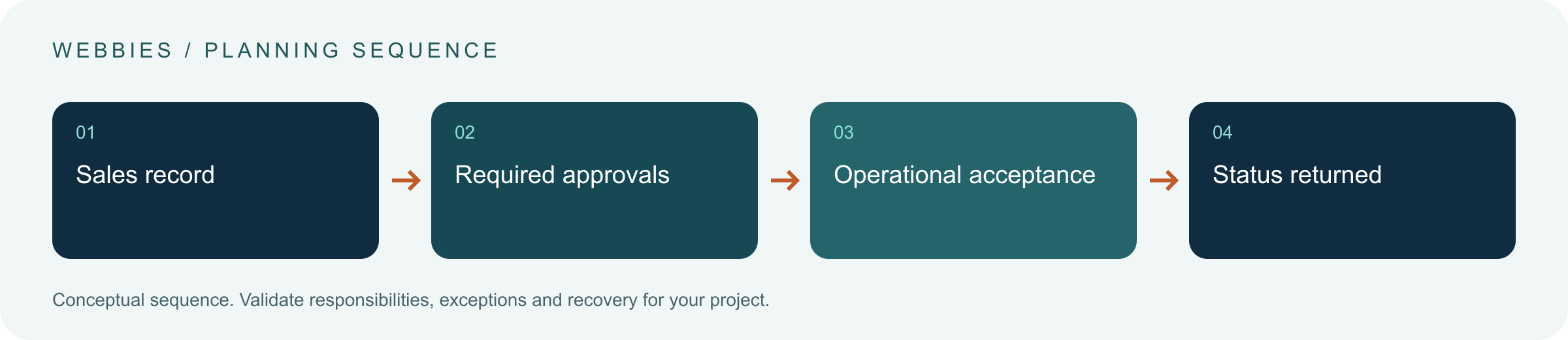
Specify which fields and approvals are required before a won opportunity can create an order or project. Return an acceptance reference to the CRM. If the destination rejects the request, display a reason and route it to the responsible owner. Keep forecast values separate from booked revenue and settlement. The goal is a shared understanding of business state, not identical dashboards with different underlying definitions.
Manage changes after the first transfer
Plan amendments, cancellations, account merges and contact offboarding. Decide how updates are propagated and how conflicting edits are resolved. Keep sensitive contact data limited to its intended business purpose. Provide reconciliation and a repair route for missed or duplicate events. Review the integration when sales processes or required fields change; otherwise a once-correct automation can quietly create incomplete operational records.
Compare the available approaches
| Approach | Suitable starting point | Main limitation or responsibility |
|---|---|---|
| One-way export | Simple reporting transfer | Changes may remain disconnected |
| Controlled handoff | Sales-to-delivery acceptance | Requires required fields and ownership |
| Two-way synchronisation | Updates across both tools | Needs conflict and loop prevention |
A practical example
A hypothetical services company transfers an approved opportunity into project setup. Scope, billing entity and delivery owner are mandatory. The CRM shows a project reference only after operations accepts the request. If the legal entity is unclear, the opportunity stays visible in a handoff queue. This preserves a sales win without presenting an unaccepted delivery commitment as ready for work.
An acceptance test worth running
Mark an opportunity won while omitting a required billing entity. Confirm that operations receives an incomplete handoff rather than an unqualified project commitment. Correct the record and resubmit without creating a duplicate customer. Then amend the scope. Both teams should be able to identify the accepted version and distinguish forecast value from booked or collected amounts.
What to measure
Track accepted handoffs, missing-information returns, duplicate accounts, stale updates and operational correction time.
Use a representative baseline and record the conditions of the comparison. Agree who reviews failures and what evidence is needed before expanding the scope. For a broader view of the related delivery work, explore Webbies services.
Practical Steps for CRM integration
- Map customer identities and authoritative fields.
- Define the event and evidence that authorise a handoff.
- Return acceptance or a visible rejection reason.
- Test amendments, duplicates and reconciliation after process changes.
Prepare a useful project brief
| Decision | What to establish |
|---|---|
| Audience | sales and operations leaders resolving customer-data handoffs |
| First boundary to agree | Map customer identities and authoritative fields. |
| Evidence of useful performance | Track accepted handoffs, missing-information returns, duplicate accounts, stale updates and operational correction time. |
| Estimate dependency | Customer-model complexity, bidirectional edits, process variation and data cleansing determine effort. |
Bring sample inputs and an example of an exception to the first discussion. Separate confirmed requirements from assumptions, and identify who can supply missing information. The brief should let a delivery team explain what it needs to investigate before making a detailed commitment.
Common Mistakes to Avoid
- Creating a new customer for every sales opportunity.
- Treating won value as automatically collected revenue.
- Synchronising every field in both directions.
Frequently Asked Questions
What does CRM integration mean in a business project?
CRM integration connects customer relationship management data and workflows with other business applications under defined ownership and handoff rules.
How should a team begin evaluating CRM ERP integration?
Map customer identities and authoritative fields. Define the event and evidence that authorise a handoff.
How do we measure whether sales operations data sync is useful?
Track accepted handoffs, missing-information returns, duplicate accounts, stale updates and operational correction time.
What affects the cost or timeline of CRM integration?
Customer-model complexity, bidirectional edits, process variation and data cleansing determine effort. A delivery estimate should follow a review of these dependencies.
What is a common misconception about CRM integration?
A CRM integration cannot repair an undefined sales-to-operations process without agreement from the teams involved.
Conclusion
A CRM connection should carry an accepted business handoff, not just copy fields. Keep customer identity, required approvals and operational state consistent enough for both teams to act. Map a sales-to-operations handoff with Webbies.
Sources and further reading
- AWS: Idempotency and retries — primary technical reference, checked during research on 30 October 2026.
Discuss your project
Map a sales-to-operations handoff. Share the current workflow, intended users, existing systems and the decision you need to make; the next step can be a 20–30 minute discovery discussion.